Don’t Get Tricked by Digital Strangers!
The Tip:
🎃On Halloween, we enjoy spooky ghosts 👻—but online “ghost” friends can be a trick! If you don’t know someone in real life (at school, on your team, or in your neighborhood), don’t add or chat with them online. Even if they seem nice in a game 🎮, they are still a stranger.
Why it matters :
🎃Children often believe online interactions are safe, especially in games or kid-friendly platforms. However, people can pretend to be someone they’re not 🎭. Teaching kids early to recognize and avoid digital strangers builds lifelong online safety habits.
Pro Tip (Teach Your Child):
Share these simple “ghost-busting rules” 🛑👻:
Don’t share personal info (name, school, phone number) 🚫
Don’t move chats to other apps 📵
Don’t keep secrets from trusted adults 🤐➡️👨👩👧
If a “ghost” friend asks for any of these—tell an adult right away!
Parent Connection 🤝:
🎃Keep conversations open and judgment-free ❤️. Instead of asking “Are you talking to strangers?” try:
“Who did you play with today?” 🎮
“Do you know them from real life?” 🤔
🎃Many school ITRTs have read Chicken Clicking 🐔💻 with students. Ask your child what happened in the story and what the character learned about online strangers—it’s a great way to reinforce this lesson in a familiar, non-threatening way.
👉 Watch it together at home: https://www.youtube.com/watch?v=FSasSWwi5Tk
Try This at Home 🏠:
Do a quick “Ghost Check” together 👻:
Look at friends/followers lists 📲
Remove anyone not known in real life 🚫
Check game chat settings 🎮
Practice what to do: Ignore ➡️ Block ➡️ Tell ✋
💬Conversation Starter:
“If someone you didn’t know came up to you while trick-or-treating and asked personal questions, what would you do? The same rule applies online.” 🎃

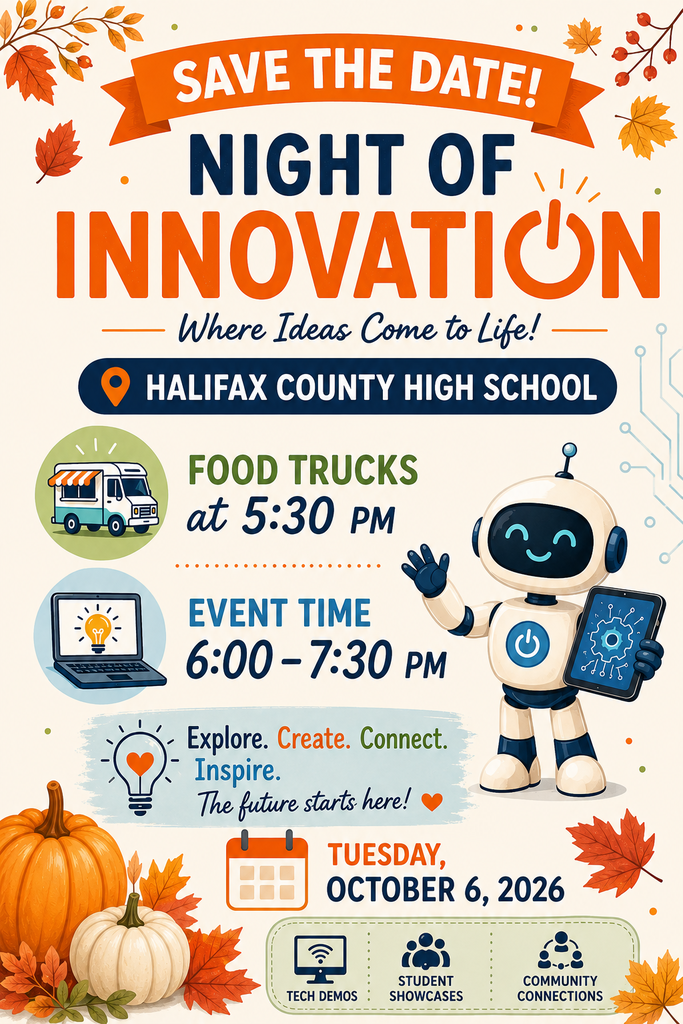
As a reminder, Halifax County Public Schools will host a Night of Innovation tomorrow, Tuesday, October 6, 2026 at HCHS. Attendees will experience technology through interactive experiences, informational displays, and hands-on exploration. A general session on being kind online will be presented by the Halifax County Public Schools Instructional Technology Specialists. Attendees can also experience the Pink Bus, a mobile cybersecurity classroom with interactive, game-based activities.
The school with the greatest percentage of students in attendance will win a prize for the school.
Food trucks will be onsite for attendees to purchase food and drinks.
The doors and food trucks will open at 5:30 PM, and the general session will begin at 6:00 PM. All attendees should enter through the front door.
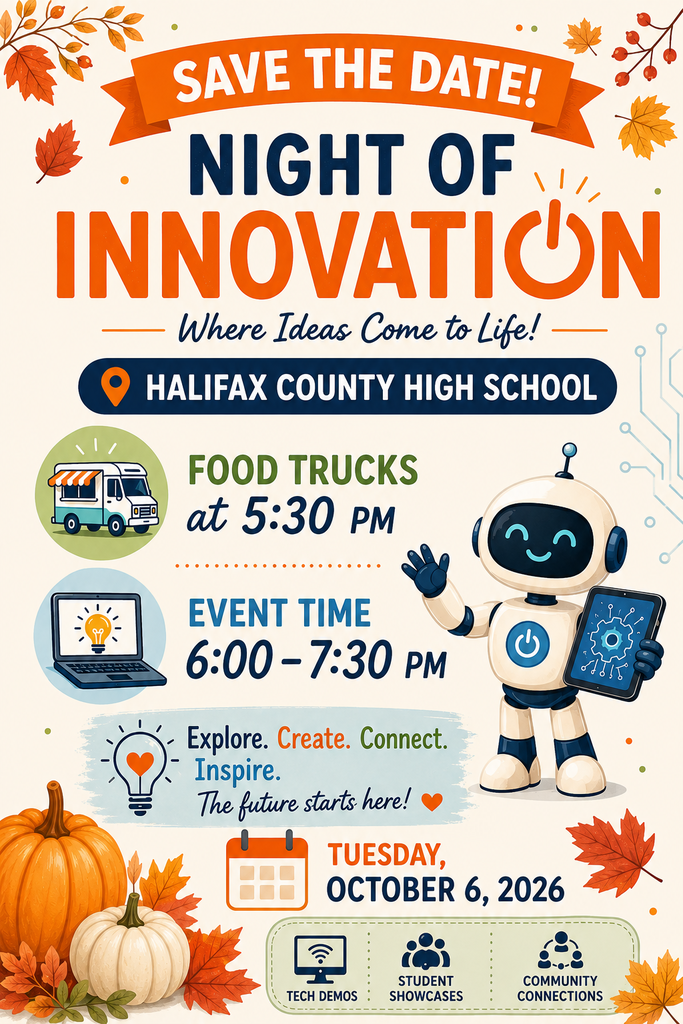

The Night of Innovation will be held October 6, 2026 at HCHS. More details to come.
Don’t Fall for AI Tricks
Tip:
🍂 Talk with your child about how some images, videos, and answers online are created using Artificial Intelligence (AI) and may not always be real or accurate. Encourage them to slow down and think about what they are seeing and hearing.
Why it matters:
🍂Elementary students often believe what they see and hear online. AI can create very realistic pictures, videos, and even voices, making it harder to tell what is real. Without guidance, this can lead to confusion, misinformation, and poor decision-making.
Pro Tip:
Teach your child to be a “digital detective” and ask:
👉 “Who made this?”
👉 “Is this real or computer-made?”
👉 “Does the voice sound natural or a little off?”
Let them know it’s okay to question what they see and hear.
Try This at Home:
Watch a short video together and practice noticing clues:
👉 Does the voice sound smooth or robotic?
👉 Do the mouth movements match the words?
👉 Does anything look or feel “off”?
👨👩👧 Parent Connection
Be mindful of what your child posts or shares online.
🍂AI tools can be used to edit photos, mimic voices, or alter videos in ways that may be misleading or harmful.
Helpful Reminder for Families:
👉 Avoid sharing personal photos publicly
👉 Use privacy settings when possible
👉 Talk with your child about asking permission before posting


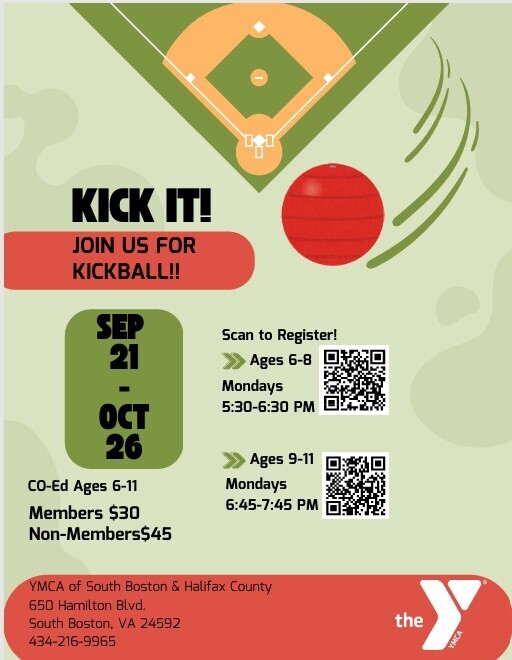
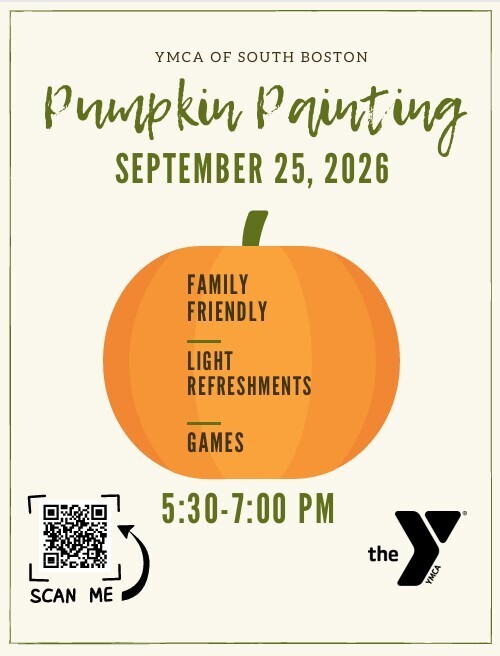

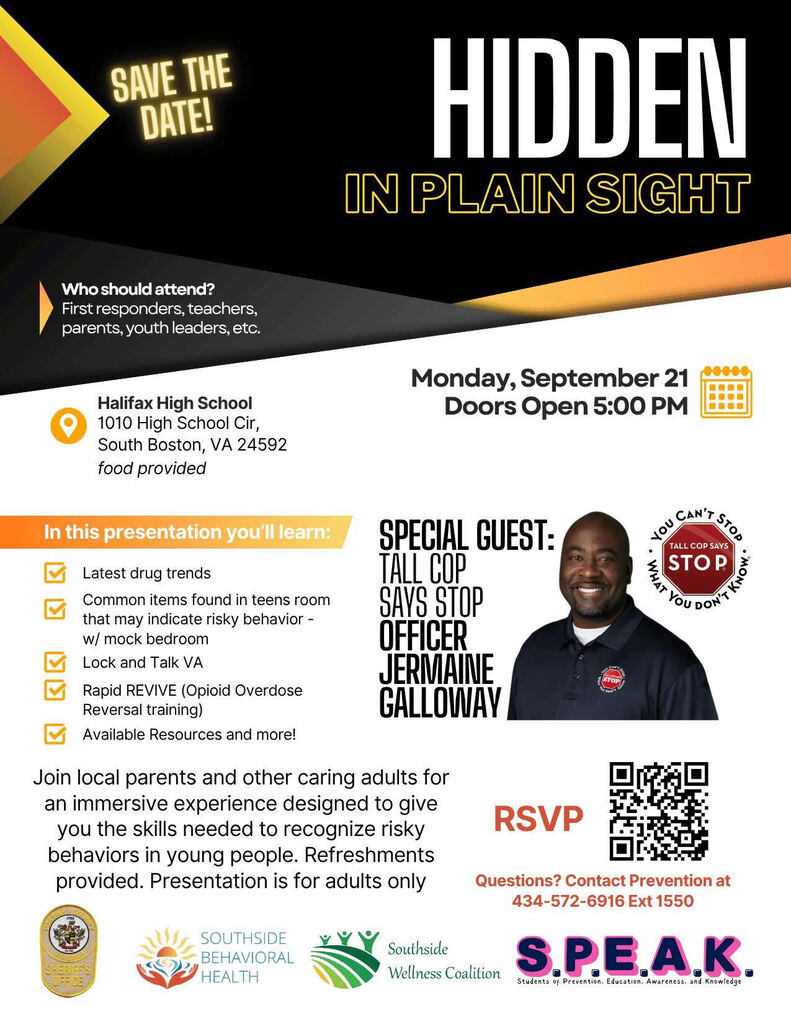
We will also be hosting a community resource fair and would love for our local partners to participate and share resources with families.
Please join us on September 21, 2026 at 5:30 PM at HCHS.
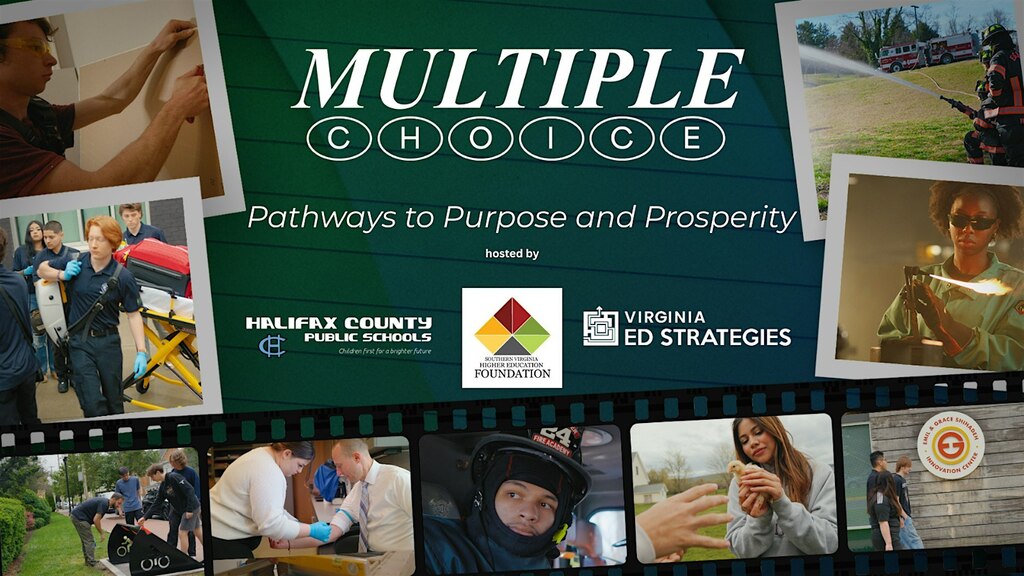
This isn’t just a movie night. It’s a chance to engage in a dynamic community discussion that could shape the future of career-connected education and workforce preparation in Halifax County and the greater region.
This event is FREE, but advance registration is required.
Click here to register:
https://www.eventbrite.com/e/pathways-to-purpose-and-prosperity-tickets-1993851743237?aff=odeccpebemailcampaigns&utm_source=eventbrite&utm_medium=ebcampaigns&utm_campaign=55724631&utm_term=ctabutton&mipa=ABIdvVu2vch0CnIuRAGzaTdG0WjgHKyPBvc5PPZUpEf1XwfowFcoBseJeLyYe-YbfdSjX3-lMbbIelgsGmTa83ZScCYtVPpAjfMQEvYJZQSR-ywruSIdLazwCxeQ9bR2crflNRna3WMrURGCruPUMKDtfK8ZjTIMxU5KQxFyHn2zi-oSYjOMna66jGji0fvheo5pAijD8bzjMyugOKOOvgARJdzyNwYfNspqzO1e3iVroQv9ziZfQn91_VlTRMImQxGE979zKKcMePbt5Vg-NNBajueDIDytsw&fbclid=IwY2xjawTxlp9wZG9mAWV4dG4DYWVtAjEwAGJyaWQRMThsalZjTHo1VGpTb05uM0pzcnRjBmFwcF9pZBAyMjIwMzkxNzg4MjAwODkyAAEeqAwlLZymFkx9BkalsgbGTmPxvirn1BzLDpg05HKqW0K5QyEljXWe8-YSvAY_aem_gEoZ-bl1jlKMoEuJWDc8Gw
Don’t miss this unique opportunity to be part of the conversation, and feel free to share this invitation with others who are invested in the success of students and economic development in Southern Virginia. Reserve your spot today and take the first step toward unlocking new pathways for our youth.
Guests will enjoy a complimentary reception with light hors d’oeuvres and beverages prepared by HCHS culinary arts students.
Watch the trailer below for a sneak preview!
https://youtu.be/wroL0kvYJLs
Parents and guardians can use the Absence Request tool to submit a request that informs the office in advance when their student is not going to be in school. After the request is processed, Campus creates an attendance record for the student.
1. On the Campus Portal, click on the main menu icon (3 lines)
2. Click on More and then Absence Request
3. Mark the student for whom you are submitting the absence request.
4. Select the reason the student will be absent from the Excuse dropdown list.
5. Select the Absence Type.
6. Enter the date(s) for the absence.
7. Upload any optional/required documents. Only one document is allowed per request and it will be attached to every student in the request.
8. Enter Comments about the absence reason.
Click on the link for directions with screenshots
https://drive.google.com/file/d/1vgJE_yjPCvXLnldZ2X4CajNEpRYsBdc4/view?usp=sharing

School will be back in session on Wednesday! With more buses, walking students, and excited drivers on Halifax County roads, let’s all do our part to keep our kids and community safe.
Here are a few quick safety reminders for your morning and afternoon commute:
🛑 Stop for school buses
Yellow lights flashing: Slow down and prepare to stop.
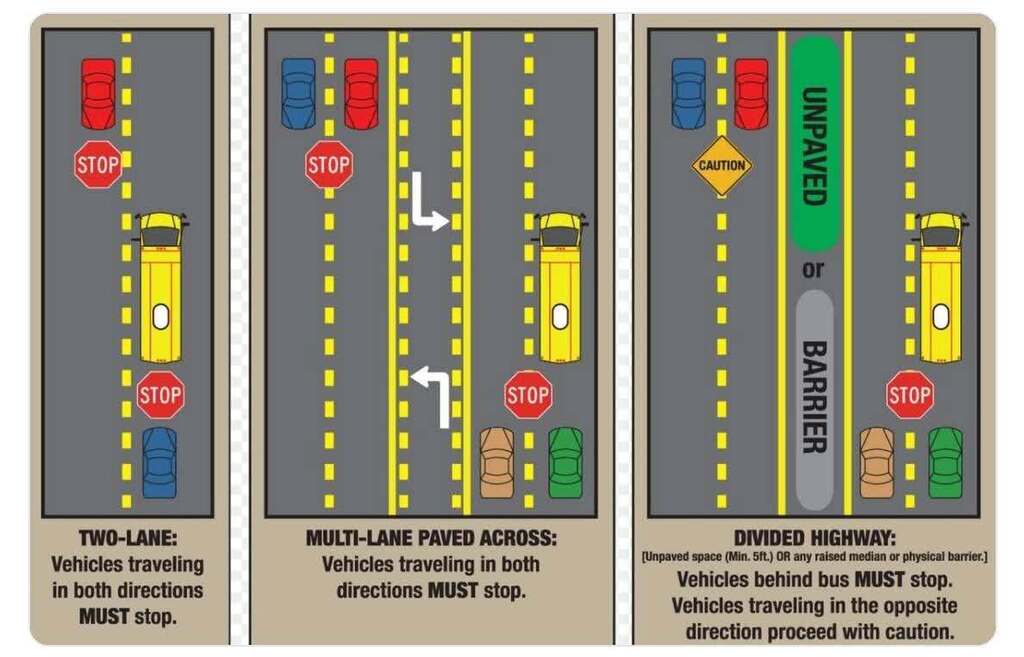
Red lights & stop arm extended: Traffic in BOTH directions must come to a complete stop until the arm is retracted.
Railroad crossings: Buses are required by law to stop at all railroad tracks—give them plenty of room!
🚗 Watch for new teen drivers: High school routes will have newly licensed student drivers on the road. Be patient, avoid tailgating, and allow extra space around school entrances.
🚸 Slow down in school zones: Obey posted speed limits, watch for crossing guards, and NEVER pass a vehicle stopped at a crosswalk.
📱 Put the phone away: Distracted driving is dangerous driving. Keep your eyes on the road, especially around neighborhoods and bus stops.
⏰ Plan ahead: Add 10–15 extra minutes to your morning drive to account for bus routes and school traffic.
Let’s keep Halifax County safe this school year!
Back to School
Set Up for Success
Tip:
🍎Before school starts, set clear screen time limits and create a simple daily routine: homework first, then limited screen use. Keep devices in shared spaces during school nights and avoid screens during meals and before bed.
Why it matters:
🍎Too much unstructured screen time can impact focus, behavior, and learning habits—especially at the start of the school year when routines are forming. Excessive screen use can also lead to decreased attention span, difficulty transitioning to tasks, and disrupted sleep.
Pro Tip:
🍎Start small and stay consistent. Even simple routines like “no screens before school” or “devices off 1 hour before bed” can make a big difference in your child’s focus and mood.
Try This at Home:
🍎Create a simple family tech routine chart (morning, after school, bedtime) and post it on the fridge so expectations are clear and consistent.

Summer is the perfect time for kids to spread their wings — both outdoors and online! Help your child build digital independence by teaching simple, confidence-boosting tech skills they can use safely on their own.
✨ Tech Tip:
Show your child how to handle small tech challenges before asking for help. Practice things like:
Restarting a frozen device or app
Connecting to Wi-Fi
Downloading updates safely
Using search tools to find answers responsibly
These moments empower them to problem-solve and think critically, while you still keep a caring, watchful eye.
💡 Pro Tip:
Praise effort over perfection! When your child figures something out independently — even a small task — celebrate it. Building confidence with technology prepares them for school, work, and life.
🌐 Helpful Website/App:
Code.org – www.code.org
Engage your child in fun, free coding games that strengthen logic, creativity, and problem-solving skills.
💬 Remember:
Just like learning to ride a bike, digital independence takes practice, patience, and guidance. The goal isn’t to remove support — it’s to raise safe, capable, and confident digital citizens! 🦅


Shore’ Up Your Security on Vacation!
The Tip:
🌞Your child may ask to connect their phone or tablet to “free Wi-Fi” while traveling—but not all networks are safe. Public Wi-Fi at beaches, hotels, or restaurants can sometimes be fake or unsecured. When possible, use your family’s hotspot or wait until you’re on a trusted network.
Why it matters:
🌞Hackers can use public Wi-Fi to see activity on a device or trick users into joining look-alike networks. This can put personal information, logins, and accounts at risk—especially for kids who may not recognize the warning signs.
Pro Tip:
🌞Turn off “Auto-Join Wi-Fi” so devices don’t automatically connect to unknown networks. Also remind your child not to enter passwords or personal information while on public Wi-Fi.
Parent Connection:
🌞Before traveling, talk through a simple rule: “We only connect to Wi-Fi we trust.” Show your child how to check network names carefully—some fake networks are designed to look like real ones.
Helpful Resource for Families:
👉 https://consumer.ftc.gov/articles/using-public-wi-fi-networks-safely
This guide explains how public Wi-Fi works and simple steps families can take to stay safe while traveling.
Try This at Home:
Check your child’s device settings and turn off auto-join Wi-Fi
Practice identifying a “safe” vs. “suspicious” network name
Set up and test your mobile hotspot before your trip
Create a family rule for when and how devices can connect
Conversation Starter:
“If you saw two Wi-Fi networks that looked almost the same, how would you decide which one is safe?”

https://drive.google.com/file/d/1zyyp-uias8wsDsI4y1d0Su7jpRBydsXY/view?usp=sharing

The countdown is almost over! ⏳🎓
Tomorrow morning at 9:00 AM, the Class of 2026 officially takes the stage. Share this link with your family, friends, and out-of-town guests so everyone can celebrate this amazing milestone together!
📺 Stream the ceremony live here: > https://youtube.com/live/WTPWIATXK_c?feature=share

We hope you have a wonderful, safe summer!